All posts by ryandavisdj2014

Conclusions:

In terms of the testing results, how do these relate back to the aims of the project?

‘To use a suitable environment and viable equipment to test the offset bipolar loudspeaker’s frequency response in an anechoic chamber?’

As one the aims stated, the testing results were conducted using adequate equipment, which involved the ‘Room EQ Wizard’ software to produce frequency responses, as well as an Earthworks QTC 1 microphone to provide a response that covered the human hearing audible range of 20Hz to 20kHz.

In addition to this, the suitable environment was in fact a low RT60 drum booth room based at the University to get adequate control of what the characteristics of the speaker would produce. Unfortunately, as stated by (Richard Jacket, Senior Research Scientist, Acoustics and Sound in Air National Physical Laboratory, Teddington. Middlesex) in an email, he stated that due to operational costs it would be too expensive to use an anechoic chamber and that much control in terms of response would not suit this project. Therefore, the choice of using a drum booth was an alternative approach.

What was a success of this project and how?

– The graph results showed mostly flat responses throughout the majority of results. This showed that there weren’t significant problems in terms of the enclosure shapes. In addition to this, it proved that the damping used had resolved harmonic distortion from the rear waves of the drivers.

– Middle and high frequencies were very clear and concise upon listening to the speaker. This would have predominantly have been down to the loudspeakers overall length of 701mm to help to reduce the wrap around energy.

– Attention to detail in the building process significantly made the entire speaker extremely heavy and rigid in terms of gluing every surface and nailing every 20cms that helped give more presence from the drivers and not through the open ends.

What improvements could have been made to improve the outcome?

– More damping could been used especially more carpet felt to cover all the internal surfaces specifically towards to the open end making sure not to choke the open end. In addition to this, even to add more acoustic filling may help improve the low end response.

– Obviously due to simulation problems in the designing process, potentially in the future a more accurate prior simulation could be created through Martin J King’s transmission line worksheets to get an accurate simulation of the box and compare it with the results.

– With that in mind, this could potentially involve slight adjusting of the length of the TQWT lines that could potentially further improve its response.

– Testing the speaker outside as suggested by Richard Jacket at Teddington Laboratory could further distinguish the testing results. However, this encounters limitations as this current time due to the sheer weight and difficulty in moving the speaker.

– Having a more powerful amplifier to relate to the 90w power from each driver instead of the 20W Tube Amplifier used could potentially get a much more distinctive response from the drivers. However, due to price limitations, the low powered tube amplifier as stated during the project, was a compromise.

– Functionality could potentially be improved, in terms of connectivity. The use of XLR inputs and outputs could further make this speaker more usable, instead of line outputs from the tube amplifier. In addition to this, this could help remove the unnecessary and untidy AWG 30 wiring from the binding posts to the tube amplifier.

Testing the Response of the Offset Bipole Transmission Line Enclosure:

How, and where the testing was conducted?

The testing of the speaker was conducted in a relatively controlled drum booth, due to limited availability and with no access to an anechoic chamber. Therefore, this was the best available option. The testing was conducted was by using the software ‘Room EQ Wizard’ to get a response that was chosen due to it being freely available and its capabilities of being able to get a loudspeaker response as outlined by (Room EQ Wizard, 2015).In terms of connecting the input and outputs, the input came from the Topping TP22 amplifier and the output came from Earthworks QTC 1 microphone that was phantom powered by the M-Audio interface connected via USB to the macbook.

The positioning was extremely key to how the response was going to be tested. For a starting point by relating back to where the offset bipole orientation came from for this project in terms of (LeJeune, 2010). In the post he explains the exact positioning for these types of speaker arrangements, by toeing them in at 45 degrees in relation to a 90 degree angle from the corner walls. An illustration is given below.


Screen Shot 2015-04-08 at 14.10.37

Figure 30 – Speaker Positioning as outlined by (LeJeune, 2010).

This was so that you could get a spectrally balanced sound with the rear driver arriving at the same time as the front driver without detrimental early reflections. Therefore, the idea was to place the Earthwork QTC 1 microphone at listening position level in line with the centre of the front cone, with the speaker positioned in relation to one of the corners of the room.  In addition to this (LeJeune, 2010), also stated about making sure the speaker was no less than 3.5 feet or 1.0668 metres from the corner, therefore this was also taken into account in terms of positioning. You can see this pictured in the images below.

2015-04-07 17.17.42 2015-04-07 17.31.01

The reason behind using the Earthworks QTC 1 microphone was primarily down to extended frequency response and its precision. As well as this, it has the capabilities of withstanding high SPL levels, therefore it seemed like an ideal microphone, as the sine sweeps from the software would be sweeping between 20Hz and 20kHz. (audible listening range) as outlined by (Earthworks Audio, 2015). Therefore, a microphone with an extended frequency response was key.

Unfortunately there was a large piano in the corner as you can see to the right of the image on the left above, however, the best idea around this, was to cover the piano in a sheet to dampen it so that the sound projected from the speaker did not reflect from the pianos reflective surface. Fortunately, due to the extensive absorbency panels in the drum booth, the RT60 seemed to be relatively low at 0.6 seconds, therefore, it did not seem to be a major problem.

2015-04-07 17.31.06

Measurements:

The main measurements was getting the sound pressure level results to see how it performed across the frequency range from 20Hz up to 20kHz using the Room EQ Wizard software.

In the three graphs below, are the results from the three different takes from the listening position. As you can see in all three the significant areas to look into are the low frequency responses and from these there seems to be dips are 62Hz and 58Hz. These could potentially mean the resonant frequency of the speaker, however to get a more conclusive idea, during this testing the consensus to get other results in terms of mic positioning and speaker placement just to reiterate the results that will further down on this post.Screen Shot 2015-04-08 at 14.33.36 Screen Shot 2015-04-08 at 14.35.10 Screen Shot 2015-04-08 at 14.35.36


By combining all three of the results together, below is an averaged sound pressure level response and even with it averaged across the entire range, with the graph zoomed in, there is still the sharp dip at 58Hz. To see if this was in fact the resonant frequency the decision was to place the microphone directly in-front of the front driver. In theory from (LeJeune, 2010), with the rear driver being extremely close to the floor at the rear, the wrap around energy shouldn’t be as severe due to its offset orientation. Therefore, in theory, by placing a microphone relatively close to the front driver the result could potentially be more accurate, as it would not pick up as much of the room characteristics as in the listening position.

Screen Shot 2015-04-08 at 14.36.46

To see if there was any significant change the positioning of the Earthworks microphone was adjusted, as shown in the images below.

2015-04-07 17.50.30 2015-04-07 17.50.35

The resulting response graphs were as follows:

Screen Shot 2015-04-08 at 14.55.15 Screen Shot 2015-04-08 at 14.55.20 Screen Shot 2015-04-08 at 14.55.10

As you can see, these were not 100% accurate due to the microphone positioning as it would not take into account all the angles of reflection especially from the rear driver sound wave hitting the centre middle wall that would reach your left ear. With the red and green graph they both had significant dips at around 95Hz, however the third take in the pink graph, there does not seem to be that dip and instead is a lot lower at 26Hz. Therefore, these three results are inconclusive.

Below the decision was to see an averaged out response of the three different takes to get this:

Screen Shot 2015-04-08 at 14.55.25

As you can see the result seems relatively flat with no significant dips or nulls.

Although all these results so far showed a dip at around 58Hz from the desired listening position and with the other closer centred position showing a relatively flat response across the low frequency range. The decision was to test each speaker individually to gain a better understanding of the overall response. Therefore, by placing the speaker dead straight with the microphone facing forwards slightly away from the cone as shown below, a frequency response of each enclosure could be gathered specifically from the front due to it being the predominant speaker at the front.

2015-04-07 17.55.28


The resulting graphs for just the front speaker with the back speaker unplugged were this:

Screen Shot 2015-04-08 at 15.10.08Screen Shot 2015-04-08 at 15.09.15


These two resulting graphs show the dips at 58Hz like previously shown for the listening position results at the start. As the room is mostly dead in terms of acoustics, we can now presume from numerous results now that the resonant frequency of the front TQWT enclosure is 58Hz. In addition to this, impressively the middle and higher frequencies from 100Hz upwards seem relatively flat proving the use of acoustic filling and carpet felts to work extremely well at damping those issues. More on this will be explained in the improvements section in the conclusion.

After this, the option was to turn the entire speaker round and try to gain some results for just the back speaker and turn the front speaker off.

2015-04-07 18.02.12

The results were this:

Screen Shot 2015-04-08 at 15.35.16 Screen Shot 2015-04-08 at 15.35.22

Obviously, with the position of the driver being close to the floor, you are bound to get the floor bounce issue with the sound projected from the speaker counteracting with the floor producing a comb filtering affect that can be noticeable slightly above 1kHz as outlined by (Brown, 2011) . However, with that in mind, that is not the main issue as the original 90 degree angled positioning to the corner eradicates that problem as seen in the first few results of this post. Instead, the idea is to try and see where the enclosure resonates. In the blue graph the only distinctive problem is at around 48Hz. However, at 48Hz on the green graph it appears as a null.

An average of the two is shown below. However, there was still no dip, other than the increase at 48Hz, but theoretically considering the speaker is completely upside down to the front speaker, and the microphone is upside down to how it should be in terms of the speaker being upside down. The result should in theory be in reverse due to its placement. So, with that in mind, for these results the problem at 48Hz can be presumed as being the resonant frequency of the back speaker, as it would be where the speaker box would resonate and the acoustics would affect the output from the speaker cone that could suggest this increase as outlined on page 10, (Bello, 2001).

Screen Shot 2015-04-08 at 15.35.37


References:

http://www.roomeqwizard.com

http://www.earthworksaudio.com/microphones/qtc-series-2/

http://www.prosoundtraining.com/site/author/pat-brown/the-floor-bounce-effect-mic-placement-for-equalization/

The Controlled-Pattern Offset Bipole Loudspeaker

Demonstration video of the speaker:

Here is a short clip to show the actual speaker working, where the song, ‘XO ft. Rob Law – Through The Night’ is being played through both front and rear speakers through an iPhone using an RCA to auxiliary cable from the back of the amplifier to the phone.

On first instincts, upon listening to the speaker, the mid and high frequencies seem really well defined from both drivers, however the low end seems to struggle if the amplifier is at less than 12 o’clock on the volume level (which is roughly 15 watts of power), which at 15watts is literally barely any power. However, the bass starts to become more distinguished above 15 watts. In the testing stage however, a sound pressure level graph reading can distinguish the actual resonant frequency of the overall speaker to get a more accurate overview of the performance of this speaker.

Youtube link:

Please note: Excuse the clicking noise throughout the clip from the camera.

Building process:

The first part of building process was to pencil out of the cut outs of the drivers and the binding posts as these were the difficult parts in terms of drilling involved, as all the 25mm MDF surfaces had already been cut to shape with the dimensions in the previous post. As you can see in the image below, here is the pencilling of one of the drivers being done with a 185mm diameter that was distinguished in the driver specifications manual. The two circles were cut 120mm from the top to the centre of the circles which was distinguished in the speaker dimensions on the previous post.

2015-03-28 10.35.57

After the driver circles had been cut out the next process was to cut out the squares for the binding posts to comfortably sit in. The idea in terms of where to place these was towards the corners near the open ends of each enclosure. This was so that it did not affect the reflections behind the drivers. The pencilling and cut outs can be seen in the images below.

2015-03-28 12.03.402015-03-28 11.58.20

Once the cut outs had been done, the next process was the pencil all the walls onto one of the enclosure sides as an easier guideline of where to place the glue and nails in order to thoroughly support the speaker in order to have sufficient rigidity.2015-03-28 11.13.59

Once the pencilling of all the walls had been done, the process was to start gluing and nailing together the inner walls starting with the front and rear faces and then onto the inner slants. As seen in the images below.

2015-03-28 12.52.502015-03-28 12.48.02 2015-03-28 12.35.15   2015-03-28 13.40.26 2015-03-28 14.06.26 2015-03-28 14.10.49

Once all this had been done, you can begin to see the shape of the two mirrored enclosures now in the image below where the fixing of the bottom could be done to begin to close of the enclosure.

2015-03-28 14.45.27

Once both the top and bottom panels had been securely fastened, using an air pressure gun to clean the MDF dust away from the inner walls and surfaces, the damping can be done before placing the last side panel onto the speaker.2015-03-28 15.08.23

In the images below you can see the damping whereby the acoustic filling is placed in the first 1/3rd of each TQWT enclosure. With carpet felt on the majority of surfaces, however more predominately towards the rear of the here the drivers would sit to maximise the damping of internal box resonances as well as all the corners.

2015-03-28 15.48.00 2015-03-28 16.07.35

One slight adjustment here was that the acoustic filling needed to fixed in some way to stop it from falling further away towards to the open end. As you can in the image above to the right, a small light felt fixing was glued to help fix the acoustic filling into place. At the same time making sure in did not entirely block the whole line.

After this had been done and all the available 2.26796 kilograms of acoustic filling equally shared into each enclosure and 2.5 square metres of carpet felt in each enclosure, the 30AWG wiring could now go into each enclosure running from both circles to their respective binding post holes so that soldering could commence once the final panel and outside painting of the enclosure   was done. Once the outside white painting had been done to give the speaker a slightly better look, and help cover the nail holes. In the images below you can see in side the circles where the majority of damping is and the cabling hanging out before soldering them to the back of the drivers. The yellow tape helped distinguish the positive terminal with the other being the negative terminal.

2015-04-04 11.06.302015-04-04 11.06.432015-04-04 11.06.51

The same can be said for the binding posts where the other ends of the cabling is viewable in the images below.2015-04-04 11.07.302015-04-04 11.07.49

Once this had been done, the next step was to to solder and fix the driver units, along with the soldering and fixing of the binding posts.

2015-04-04 12.26.40-1 2015-04-04 12.26.47

Now the speaker can be seen above with the driver units and binding posts all tightly secured in. Now the the next and final step was to use 2 of the 30 AWG wiring cables from each binding post and connect them to the back of the Topping TP22 amplifier which can be seen at the moment of the top of the speaker in the image above.

In the image below you can see the outside connections, that at this point look slightly messy however at a latter stage once it is left in a room, the intention is for the cabling to neatly fastened. However, as after this the next step is to test the speaker the moving of the speaker would require significant help as the speaker does weigh a considerable amount, and to stop the cabling from catching anything the binding posts making it easily un-screwable.

2015-04-06 16.27.11

Finally, in the building process, here is the final two images below, showing the front and back of the enclosure.

IMG_1717 (2) IMG_1719

Enclosure components:

Enclosure components:

2015-03-27 15.50.37

In the image above , this is wiring that will be used to connect the Fostex FE206en drivers (positive and negative terminals from the back of the driver to the gold binding posts.

2015-03-27 15.50.532015-03-27 15.51.12

These are the two gold binding posts that will be used. As you can see they consist of a positive and negative terminal to easily attach the wiring to on the back and on the front. The two binding posts will be placed in the corners towards the open ends of each enclosure which will be shown in a later post.

2015-03-27 15.52.202015-03-27 15.52.31

These are the two Fostex FE206en full range 8 inch speaker drivers as mentioned throughout, which will predominantly project the sound from the front and rear in offset orientation.

2015-03-27 15.53.04

This is the acoustic wool (5lbs), of which 2.5lbs will be placed in each enclosure towards top half of the enclosures to minimise the vibrational energy coming from the rear of the drivers.

2015-03-27 15.54.38

This is the wood glue that will be used to stick each MDF slab together, along with thick nailing to add to the rigidity of the whole enclosure.

Building dimensions and equipment used:

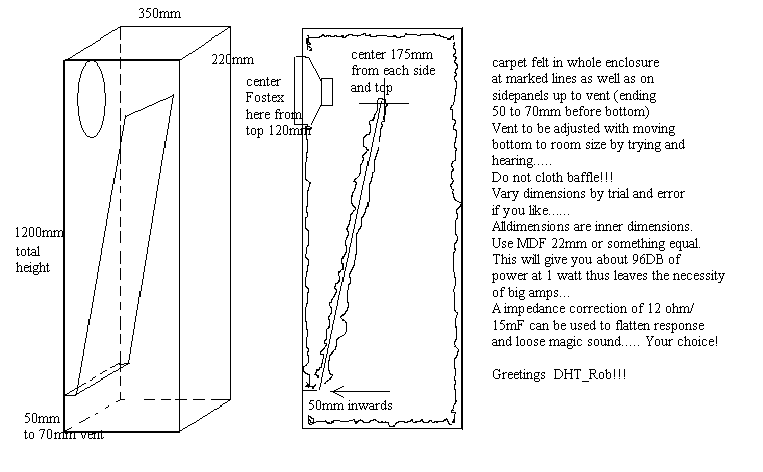
As briefly mentioned in the previous post the dimension idea of the enclosure came from (DHTRob, 2015) that happened to use the dimensions in a TQWT design using the Fostex FE206en. However, as this project was going to be in an offset bipole orientation certain tweaks had to be made.

For instance in figure 26, is the overview of the dimensions for the project.

From this, 25mm MDF was used instead of 22mm due to availability but also to add more rigidity to the enclosure as it was consisting of two enclosures connected together.

Here are the dimensions in full:

701mm x 273mm (top slab) (quantity = 1) – slightly wider to start with due to sanding the edges to reduce diffraction problem as explained in the proposal process of this project.

1200mm x 220mm (middle wall) (quantity = 1) – to support the overall enclosure and to separate the two TQWT enclosures.

1150 x 220mm (front and rear face) (quantity = 2) – 185mm diameter circles were cut of each face to place Fostex FE206en drivers in them. These circles were cut 120mm from the top of the enclosure as similarly used by (DTHRob, 2015).

975mm x 220mm (inner slants) (quantity = 2) – these are the two slants for inside the TQWT enclosures, to give the TQWT characteristic and help provide a more controlled low end.

50mm x 220mm (short indent attachments for the inner slants) (quantity = 2) – these are the two small pieces of MDF to help attach the inner slants to the enclosure.

701mm x 230mm (bottom slab) (quantity = 1) – this was sanded down slightly so the width would have slightly changed to coincide with the 220mm general width of the enclosure.

Screen Shot 2015-04-01 at 13.28.44

Figure 26 – Dimensions overview of the Offset Bipole Enclosure.

References:

The simulation compromise:

The simulation process was a difficulty in terms of managing to simulate the actual enclosure shape entirely, and the fact the simulation itself was too difficult to get an accurate dimension overview of the enclosure, therefore a compromise was made as described in the next paragraph. However, the simulation did create a resulting waveform to show the driver’s response in a tapped enclosure which is ideal in terms of how it will perform in the TQWT design as this design is a type of tapered design. Therefore, diagnosing certain issues in certain frequencies can be distinguished before building and testing the enclosures.

As mentioned, a compromise was made and the decision was to use a similar technique in terms of the TQWT design of a similar project that happened to use the Fostex FE206en driver. (DHTRob, 2015), talks about using the Fostex FE206en driver in his TQWT design. With this design, the idea was that at least with this project there would be dimensions to use and tweak slightly to the preference of the offset bipole enclosure in this specific project.

As you can see in figure 25, these were the dimensions used by (DHTRob, 2015) in his TQWT design. These dimensions were used as a guideline for this offset bipole orientation in terms of the building dimensions, however certain tweaks were made during the building process for better optimisation that will be talked about in a later post.

Screen Shot 2015-04-01 at 11.31.04

Figure 25 – A TQWT Enclosure dimensions for a Fostex FE206EN driver.

(DHTRob, 2015), along with figure 25, described about using carpet felt on the inside of the enclosure along the marked lines in the right hand side of figure 25, to help dampen the resonances within the enclosure, which will be described about in more depth later on. In addition to this, a suggestion was made to use 22mm MDF or something similar to give around 96dB of power at 1 watt, that advocates the need for a large powered amp. In this project, this would be applicable to use as the process was to use a low powered Topping tube amplifier.

Finally, another suggestion by (DHTRob, 2015), was that by adjusting the vent between 50mm to 70mm depending on the room, this could affect the ‘lag’ in the mid frequencies in terms of how the speaker is perceived, however due to time constraints the idea was to test this project in a more controlled room and potentially outside, therefore the decision was made to have a 50mm opening for both enclosures to simplify the matter.

All the design tweaks will be thoroughly explained in the building process posts later.

References:

http://www.dhtrob.com/installatie/tqwt_en.php

Enclosure Parameters and Simulation

Due to difficulties in instigating the enclosure controls on Leonard Audio’s Transmission line software, an alternative approach was to use Hornresp that provides a similar process in terms of enclosure simulation for the driver input parameters. However, the simulation WILL not entirely dictate the response of what the final enclosure will perform to. This is due to the fact that, damping will affect the middle and higher frequencies, as well as lowering the resonant frequency. In addition to this, the simulation does not take into account air density especially as the idea is to test the speaker in a studio live room, as well as outside on a non-windy day as advised in an email from Teddington Laboratory. As you can see from the input parameters in figure 10 in Hornresp; (Sd, Cms, Mmd, Re, BI, Rms, and Le were all inputted from the Fostex FE206en specifications manual), these all dictate its relative performance within the enclosure.
parameter
Figure 10 – Input Parameters in Hornresp
Sd = 206cm squared
Cms = (calculated by the Sd of 206cm squared in the calculate parameter setting in the ‘Tools’ menu)
Mmd = 12.2g
Re = 6.80 ohms
BI = 10.65 tesla per metre
Rms = 0.66 (calculated by Fs of 45Hz and Vas of 4.57 using the calculated parameter setting in the ‘Tools’ menu)
Le = 0.0525mH
As for Vrc, Ap1, Vtc, Atc, Lpt, Lrc, these were all set to 0. This is because they represent the volume of the enclosure in terms of stuffing density and air density, which at this time can not be calculated until I have tested the speakers performance, as I will be manipulating the amount of density whilst testing.
This will be done using the Acoustic filling, and the possibility of using fabrics to curve the sharp corners within the enclosure that will reduce resonances. In addition to this the air density will change depending on the environment the speaker will be in.
Therefore, the decision was to leave these parameters at 0. In addition to this, in a video by (Zobsky, 2013), they provide a tutorial on how to create a TQWT response in Hornresp and in doing so, they advised to leave these parameters at 0, to help reaffirm this decision.
As for the parameters above the line in figure 10 according to (DIY Audio, 2008), S1, S2, S3 and S4 relate to certain lengths within the enclosure as illustrated in the (DIY Hifi Forum , 2013). In terms of the other input parameters, much of which was kept the same as they do not affect the enclosure characteristics for a tapped TQWT horn enclosure.

References:

The TQWT (Tapered Quarter Wavelength Tube) Design:

Background Information of a TQWT:

Before producing a simulation or adaptation in terms of what the speaker will look like, the idea was to conjure information about using a specific design within the mirrored enclosures. With that in mind, the option was to use a design first introduced by Paul Voigt in 1930, known as the TQWT or Voigt Pipe that integrates the 1/4 wavelength pipe length design used in transmission lines but with a different approach to improve bass response.

As outlined by (Ordina Thor, 2015), in terms of a TQWT, its shape incorporates a conical horn with a relatively high cutoff frequency. However, unlike normal transmission lines where the driver is commonly placed at the apex of the horn, this design adjusts the placement of the driver to 1/3 the way along the horns length.

This method as outlined by (Ordina Thor, 2015), produces a horn loading in the upper bass region that makes it ideal for use with full range drivers, due to their small excursion. Generally, full range drivers with a QTS (how strong the magnet and motor system are) around 0.4 work well with this design, however, the choice was made to use the Fostex FE206en full range drivers with a QTS of 0.19 as a compromise. The reason for this is that so it can withstand the upper bass horn loading due to the design. However, the intention is to test this speaker to a reasonable level and not at extreme SPL levels so this compromise should in theory not be a major issue.

In terms of the port, the rear wave is determined by the driver type, internal damping and desired response. In this project the desired response being 40Hz, 5Hz lower than the drivers resonant frequency of 45Hz. This hopefully being achieved by internally damping the inside of the enclosures with acoustic filling material and potentially a damping material for the corners to use the refraction.

The height of the port should be adjusted through measurements and from the test results. However, in this case the test results will help provide areas of improvement for future project reference.

For the simulation of the system, response of the enclosures will be determined by the line length and vent resonant frequencies. As well as this, the driver position will create destructive interference of the higher frequencies that should not pass through the vent otherwise it could affect the overall harmonics.

The advantages as to why the choice was made to use a TQWT was primarily due to its acoustic load of the driver that allows a smoother and more tight bass response than a normal transmission line. In addition to this, by using considerable amounts of internal damping it reduces the problem of comb filtering due to the line resonances at lower frequencies therefore giving it a more prolonged line that combines the horn and transmission line characteristics.

The image in figure 14 shows the outlined look of what the speaker will look like using the TQWT design, but using a mirror effect to produce an offset Bipolar speaker.

bipole drawing

Figure 14 – The Offset Bipolar speaker incorporating the TQWT design in a mirrored orientation for this project.

References:

(Orina Thor, 2015) – http://yu-ra.tripod.com/tqwta.htm

Calculations:

To thoroughly understand and gather sufficient calculations that would help with the designing of the enclosure. Despite using Leonard Audio’s suggested calculations in the previous blog post, an extra option was to delve into Martin J King’s Alignment tables to gain a better understanding using an excel spreadsheet to conjure together the key components needed to create the enclosure.

By inputting the driver properties, amount of taper, and constants, the process with this excel spreadsheet would help conjure the area of closed and open ended areas, effective length, as well as Dz (peak value of shape function as a function of frequency and area ratio) and Dr (resistance factor).

Screen Shot 2015-02-24 at 18.23.41

Figure – 1.1 – Excel spreadsheet of fundamental calculation results for the transmission line speaker.

The Dz value on this spreadsheet was derived by using the table based in the Alignment table document as shown below in figure 1.2.

Screen Shot 2015-02-24 at 18.32.34

Figure 1.2 – Peak Value of Shape Function (Dz).

From above the used information was:

SL = cross sectional area of open end.

SO = cross sectional area of closed end.

45Hz = the Fostex FE206en driver’s resonant frequency.

SL/SO                         45Hz

  • 10                      9.882
  • 5                        17.474
  • 3                        24.883
  • 2                        31.556
  • 1                        43.715
  • 0.5                     55.787
  • 0.333                 62.595
  • 0.2                     70.862
  • 0.1                     82.085

Assuming SL/SO = 1

Dz = 43.715


Calculating the effective length using the provided table from Martin J King’s Alignment table.

Screen Shot 2015-02-24 at 18.34.25

Figure 1.3 – Transmission line effective length as a function of the frequency and the area ratio.

In figure 1.3, you can see that the most important and useful information is:

SL/S0                      45Hz (measured in inches)

  • 105                 106.1
  • 5                     98.4
  • 3                     91.4
  • 2                     85.4
  • 1                     74.7
  • 0.5                  64.7
  • 0.333              59.3
  • 0.2                  53.3
  • 0.1                  46.0

Therefore, from this table, looking at the assumption of SL/SO = 1, the effective length would be 74.7 inches and in metres that would equal 1.89738m.


As for calculating the Dr from the first excel spreadsheet, the spreadsheet is programmed whereby when SL/SO = 1, the Dr value at 45Hz is 0.1910. To make sure this worked the SL/SO value was temporarily changed to different values from 10 to 0.1, with the result of there being no change, with the value of the resistance factor remaining at 0.1910 despite changes in the cross sectional area.


Another fundamental calculation was calculating SO/Sd (Sd = surface area of the cone) using the given calculation by (King, 2006).

S0/Sd = ρcSd DZ DR Re /(Bl)2

SO/Sd = (1.21 kg/m3)(340 m/sec)(0.0206 m2)(43.715)(0.1910)(8 ohms) / (10.65 N/amp)2

SO/Sd = 0.102794m2

(SL/SO = 1 so, SL = SO)

With the Dr, Dz, Sd and the effective length calculated, the problem that (King, 2006), reiterated was that there tends to be acoustic impedance at the open end that adds 0.085m to the actual length. Therefore, another calculation needed to be made.

L (actual) = L (effective) – 0.6 (SL/π)1/2

L (actual) = 1.89738m – 0.6 (0.10279m2/π)1/2

= 1.788m

Considerations were made in this mathematical process whereby the air density was kept at 1.21 kg/m3 as calculated in numerous examples by (King, 2005) within the Alignment document as this was a given average in air mass. In addition to this, the decision was made to use the speed of sound as 340m/s.

Link to completed excel spreadsheet for the transmission lines as shown in figure 1.1

calculated alignment table for tl design.

References:

King, 2005, Classic Transmission Line Enclosure Alignment Tables – http://educypedia.karadimov.info/library/Alignment_Tables.pdf